Keeping Write and Read operations separately

In this article I wanted to share our team experience on how we arrived at particular architecture on our back-end solution. On the back-end we wanted to work with technologies that our team is familiar with and had an experience with before but at the same time is not outdated and has a great potential in the near future. In our case it was ASP.NET Core framework. I am not going in to the endless discussion about what framework or language is the best, from my point of view it is useless since such a topic is very biased. And I already mentioned in one of my previous blogs that despite the fact that the software development supposed to be an exact science, and many aspects of it really is, the choice of language, frameworks and best practices many times is just a matter of personal preference – something that you feel more comfortable with and it doesn’t have any scientific justification. And when I will be laying down the arguments for the solution we came up with it will be presented from our team’s point of view and how it helped us to make a design and implementation more clear and easier to understand, which might not be the case for other teams.

ASP.NET Core comes comes with some prepacked architecture that satisfied our needs. For REST full Web API solution MVC is very suitable design pattern and gave us a good starting point. Dependency injection in turn allowed us easy start to write unit tests and mock dependencies. But the more complex solution became the more we saw that we need to extend our initial project with more general architecture, after all MVC is just an UI level design pattern. This wasn’t the first project in our team’s experience when we had to split application’s code in layers. Some years ago very common was 3 tier architecture:
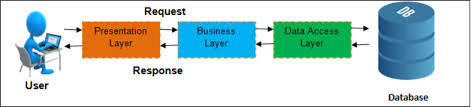
Three tier Application

And we used this architecture quite a lot. In some projects we felt it suited our needs perfectly, but in some we had a feeling that we do some kind of workaround to fit the architecture. For some time I could not really even explain why those projects didn’t comply with the above architecture until the moment when I read about Command and Query Responsibility Segregation (CQRS) pattern. It was one of those aha moments when you discover what was really bothering you all this time. In the traditional 3 tier architecture the same data model and the same database is used for read and write operations. It works well when we need to display the same information we saved earlier. But the more complex application becomes the more a model we use to save data starts to deviate from a model we use to display data. For example most of the applications today require a user to create a profile or an account. Let’s say we save this information in table User and in order to do that we use an model with the same name. In case we want to see our account information we will fetch the data from the same table User. But this is only one use case where we are displaying the information about user. In real world applications information about user is displayed in many other pages together with other information, for example in e-store that would be information about product and product category, in blog that would be a post and so on. And in order to receive data suitable for a view complex queries with joins and sub-queries are used. And not only models for read and write operations are different but the requirements for those operations are different as well. In case of insert update and delete operations the database should be normalized that allows us to minimize duplicate data and avoid data modification issues. The database normalization usually results in more tables than initial design. The query operations on the other hand are focused more on performance, that can be improved by denormalizing tables. The beauty of CQRS is that it allows to separate the write and read flows by using different models and even different databases. In last case it would allow to scale the databases for read and write operations independently. And at some point of time this feature may become very crucial since write operations are significantly less that queries. As you can see there are several levels how far we can separate commands (insert, update, delete operations) from queries (read operations):

  • The lowest level of read and write operation separation is on Repository level – we are using the same Domain model for write operations and for display data in UI, but we have a separate method in Repository for querying database. In order to display only necessary data we have to introduce View model and map data from Domain model to View model.
  • Next level of CQRS maps View Models directly to database queries. There is no need for mapping between Domain model and View model anymore. On database level we still have normalized tables that correspond to Domain model. View models in this case correspond to queries that involves joins and sub queries.
  • The two above levels of separation sometimes are not regarded as real CQRS pattern but are known as CQS (Command Query Separation) pattern, therefore only the next level of separation when write and read operations are regarded as two separate workflows throughout an application is considered as CQRS pattern.
  • The final level of separation goes further even to the database layer, where each type of operations interact with its own database

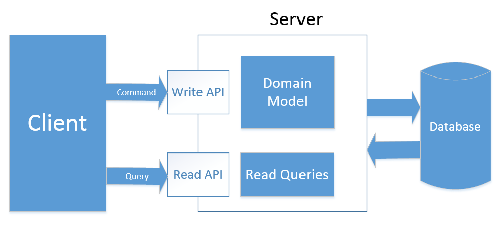
In our back end API solution we decided to separate write and read operation on the application level and not to use a separate storage, but instead we are using SQL Views for queries. It allows us avoid data synchronization between the databases. But at the same time architecture is opened for further extension and possibility to add separate storage for queries. And so we ended up with following architecture:
Visit our website and join the mailing list. Our app is coming soon:


http://fitradar.me/

Bringing security in FitRadar solution

In this article it is time to talk about how we secure our mobile application and our back-end API. Most of the information displayed in Fitradar mobile application is user dependent. Starting with user profile that has unique information for each user and can be changed or deleted only by the owner of the profile and ending with sport events map and timeline where information is built based on user preferences. And we have to provide access to third party integration services like Firebase Storage and payment gateway. As you can imagine in order to allow our application users to store and access personal information in a secure way we needed to implement user authentication and authorization.

It was clear from the very beginning that we are not going to develop our own authentication service but instead we will use third party solution. And before we started to explore available solutions we laid down following requirements:

  • the access to Fitradar Web API should be granted only to authenticated users
  • the access to Fitradar mobile application should be granted only to authenticated users
  • the access to Fitradar Web API should have different privilege levels
  • the access to third party resources like Firebase storage should be granted from the same authorization service
  • the sign up and sign in pages should be part of the Fitradar app

After some investigation we came to conclusion that combination of OAuth2 and OpenID Connect protocols is the best solution for our needs since it:

  • provide a mechanism for our resource and third party resource protection
  • authenticate users using local or remote account store

Once we were clear about the authentication flow and protocols we started to look for the OAuth2 and OpenID Connect protocol implementation providers. First we wanted to have as much as possible control over authorization service, because we didn’t want to land in situation where authorization service would restrict our application look and functionality. For example RFC8252 (OAuth 2.0 for Native Apps) states that: “OAuth 2.0 authorization requests from native apps should only be made through external user-agents, primarily the user’s browser.” And that might enforce our app to use authorization server sign in and sign up user interface. And since on our back-end we are using ASP.NET Core we decided to use IdentityServer. For a while it worked quite well, but then we started to noticed that there are few aspects of the OAuth2 protocol that we have to implement by ourselves, like Access token lifetime in our mobile app. So we started to feel that we are spending too much time on implementing and maintaining the protocol features that we were quite sure should be working out of the box. Although IdentityServer offers full fledge OAuth 2.0 and OpenID Connect implementation but we still had to host it on our environment and maintain it by ourselves. And the maintenance question bothered us the most. For the startup company with limited human resources to have a solution that might require an administration seemed for us a high risk. If something goes wrong with authentication we will have to put all our effort to fix it, which means the other work will suffer from it. So we decided to look for a cloud solution that would free us from the maintenance burden. And once again we searched for available authentication and authorization providers but this time on a cloud. And after a while we came up with two potential providers: Firebase Authentication and Azure Active Directory. First Active Directory seemed a good solution for our needs:

  • very well established user management system (although we just needed a tiny portion of all available feature)
  • good documentation and code samples
  • very easy integration with .Net Core
  • possibility to use custom sign up and sign in pages

Although Azure AD integrated very well with our Web API and there are good sample projects how to use it with Android and iOS applications we were not sure how well it will integrate with Firabase Storage that we are using to store user images. It turns out we can grant the access to the Firebase storage resources only to Firabase users. To integrate with other OAuth providers Firabase creates a new user account after user has signed in for the first time and links it to the credentials. The fact that we would have user accounts on two authorization servers that we have control over really held us back from integrating Azure Active Directory B2C in our solution. From the other hand we were hesitant to start to use Firebase Authentication service in our ASP.NET Core solution as well, since we were not sure how much time and effort it will require from our team. But after all the Firebase Authentication is just another OAuth 2.0 and OpenID Connect provider that issues identity and access tokens and Jwt bearer authentication middleware in ASP.NET Core application can validate those tokens and authenticate a request. So we decided to spend some time to create a proof of concept project that would show us how much time we will have to invest in order to integrate Firebase Authentication in our Web API authentication solution. And it turns out that requires just a few lines of code in Startup.cs file:

services
    .AddAuthentication(JwtBearerDefaults.AuthenticationScheme)
    .AddJwtBearer(options => {
        options.Authority = "https://securetoken.google.com/fitradar-firebase-project";
        options.TokenValidationParameters = new TokenValidationParameters
        {
            ValidateIssuer = true,
            ValidIssuer = "https://securetoken.google.com/fitradar-firebase-project",
            ValidateAudience = true,
            ValidAudience = "fitradar-firebase-project",
            ValidateLifetime = true
        };
});

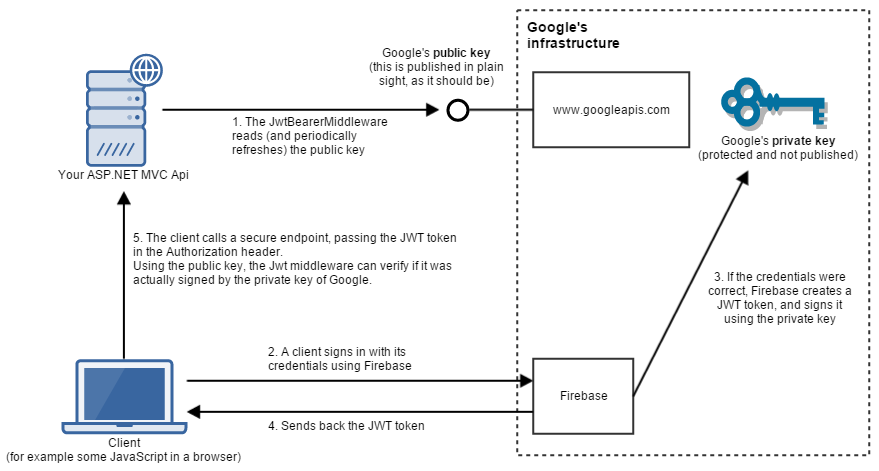
And bellow is the final solution we are using to secure our and third party resources and authenticate a user

Please visit our website and join the mailing list. Our app is coming soon:
http://fitradar.me/

50 Great Reasons To Exercise

  1. Lifts your mood
  2. Improves learning abilities
  3. Builds self-esteem
  4. Keeps your brain fit
  5. Keeps your body fit & able
  6. Boosts mental health
  7. Boosts your immune system
  8. Reduces stress
  9. Makes you feel happier
  10. Has anti-aging effects
  11. Improves skin tone and colour
  12. Improves sleeping patterns
  13. Helps prevent strokes
  14. Improves join function
  15. Improves muscle strength
  16. Alleviates anxiety
  17. Sharpens memory
  18. Helps to control addictions
  19. Boosts productivity
  20. Boosts creative thinking
  21. Improves body image
  22. Gives you confidence
  23. Helps you keep focused in life
  24. Improves eating habits
  25. Increases longevity
  26. Strengthens your bones
  27. Strengthens your heart
  28. Improves posture
  29. Prevents colds
  30. Improves appetite
  31. Improves cholesterol levels
  32. Lowers risk of (certain) cancers
  33. Lowers high blood pressure
  34. Lowers risk of diabetes
  35. Fights dementia
  36. Eases back pain
  37. Decreases osteoporosis risk
  38. Reduces feelings of depression
  39. Prevents muscle loss
  40. Increases energy and endurance
  41. Increases sports performance
  42. Increases pain resistance
  43. Improves balance and coordination
  44. Improves oxygen supply to cells
  45. Improves concentration
  46. Helps with self-control
  47. Lessens fatigue
  48. Increases sex drive & satisfaction
  49. Makes life more exciting
  50. Improves Quality of Life

Visit our website and join the waiting list. Our app is coming soon:

http://fitradar.me/

Bringing order in files

One of the main paradigm we followed during Fitradar application development was Object Oriented Programming paradigm. And the main objectives of OOP are:

  • to organize the code in such a way that data and functions using its data stick together in one entity (class),
  • to extract reusable parts in separate entities (classes interfaces).

And as we followed the OOP principles and patterns our big code evolved in to many small files, each representing one or sometimes several entities. Each file contained clean and well organized code that was easy to maintain. From one hand we reduced the size of the files and such improved the navigation within a file but increased the number of files. And the more files we produced the more harder it became to navigate between the files. And very quickly it became clear that we need a new way how to organize our code-base files that anyone could quickly find a needed file. And since there are several ways how to organize the files in packages and the source code packaging really depends on the project, in this article I wanted to share our teams experience on how we found a way that helped us to find file quicker in our code base.

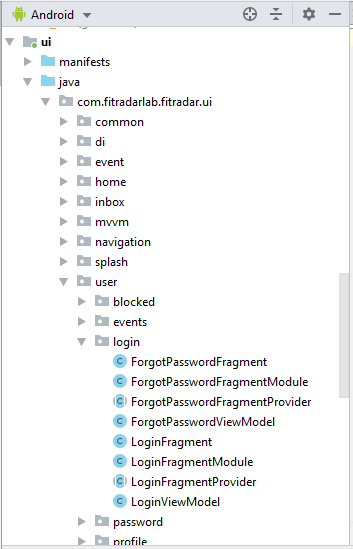
The goal of organizing files in packages is to allow a developer or any other person who is working with a source code easily find a needed data type. In order to achieve this we had to introduce particular principles on how to organize files within a packages. And once a person learns these principles it should be a breeze for him to find a necessary type. When we thought about it, we came to conclusion that these principles should act like search algorithm but for human. The basic partition of our source code in separate projects was predefined by Clean Architecture. It gave us a basic understanding where to put files on the high level. In our first attempt we tried to put the same type data under the same package. For example all the repositories definitions we kept in package com.fitradarlab.fitradar.domain.repository, all the retrofit endpoint definitions we kept in package com.fitradarlab.fitradar.data.net.endpoints and so on. This kind of approach introduced by Clean Architecture worked well in data and domain projects, but when we tied to apply it to the UI project it didn’t really helped us. And the reason was the way how we worked with UI part of the project. Our work was organized around the use cases. And to implement a use case on the UI level we had to work simultaneously on Activity, Fragment, ViewModel, Dagger dependency Module, layout and navigation. All these types were located in different packages and under each package there were already quite a few other files and therefore it was hard to find a needed file fast. First to mitigate the problem we tried to keep all the files of a use case opened, but we realized quickly that the more files we open in Android Studio the less we see of a file name in a tab because it shrinks. So even on our big screens we could have only 5-7 files opened, but in many cases we needed more than that. It was not right away that we noticed that the files we try to keep opened belong to one use case, but once we realized that it became clear that we need to put those files under the same package. Once this discovery was made the new packaging structure for UI project was born. We completely refactored UI project by introducing packages that reassemble the names of our use cases. And thanks to Android Studio refactoring tools it took only a few hours, and after that we really felt comfortable with the new packaging structure. Now we didn’t have to keep the bunch of file opened because all the files we needed to work with were visible under the single package in Project window.

New UI project package structure

But there was still one problem left – the resources files. Contrary to source code where developer can create a hierarchy of packages the resources have only several predefined folders and the most used resource types like layouts and drawables usually have long list of files. And once again we applied the use case approach and came up with following naming convention for our layout files: the layout file starts with the type – fragment, activity, row or view, then we mimic the name of the package and the name ends with unique name of the layout. For example the layout for our timeline page has the name fragment_sport_event_timeline.xml. Unfortunately we still can’t find a good naming strategy for drawables and other shared resources that are not bind to particular use case, but already now with these new naming conventions we see a noticeable improvement in our source code maintenance.

Visit our website and join the mailing list. Our app is coming soon:

http://fitradar.me/