Bringing security in FitRadar solution

In this article it is time to talk about how we secure our mobile application and our back-end API. Most of the information displayed in Fitradar mobile application is user dependent. Starting with user profile that has unique information for each user and can be changed or deleted only by the owner of the profile and ending with sport events map and timeline where information is built based on user preferences. And we have to provide access to third party integration services like Firebase Storage and payment gateway. As you can imagine in order to allow our application users to store and access personal information in a secure way we needed to implement user authentication and authorization.

It was clear from the very beginning that we are not going to develop our own authentication service but instead we will use third party solution. And before we started to explore available solutions we laid down following requirements:

  • the access to Fitradar Web API should be granted only to authenticated users
  • the access to Fitradar mobile application should be granted only to authenticated users
  • the access to Fitradar Web API should have different privilege levels
  • the access to third party resources like Firebase storage should be granted from the same authorization service
  • the sign up and sign in pages should be part of the Fitradar app

After some investigation we came to conclusion that combination of OAuth2 and OpenID Connect protocols is the best solution for our needs since it:

  • provide a mechanism for our resource and third party resource protection
  • authenticate users using local or remote account store

Once we were clear about the authentication flow and protocols we started to look for the OAuth2 and OpenID Connect protocol implementation providers. First we wanted to have as much as possible control over authorization service, because we didn’t want to land in situation where authorization service would restrict our application look and functionality. For example RFC8252 (OAuth 2.0 for Native Apps) states that: “OAuth 2.0 authorization requests from native apps should only be made through external user-agents, primarily the user’s browser.” And that might enforce our app to use authorization server sign in and sign up user interface. And since on our back-end we are using ASP.NET Core we decided to use IdentityServer. For a while it worked quite well, but then we started to noticed that there are few aspects of the OAuth2 protocol that we have to implement by ourselves, like Access token lifetime in our mobile app. So we started to feel that we are spending too much time on implementing and maintaining the protocol features that we were quite sure should be working out of the box. Although IdentityServer offers full fledge OAuth 2.0 and OpenID Connect implementation but we still had to host it on our environment and maintain it by ourselves. And the maintenance question bothered us the most. For the startup company with limited human resources to have a solution that might require an administration seemed for us a high risk. If something goes wrong with authentication we will have to put all our effort to fix it, which means the other work will suffer from it. So we decided to look for a cloud solution that would free us from the maintenance burden. And once again we searched for available authentication and authorization providers but this time on a cloud. And after a while we came up with two potential providers: Firebase Authentication and Azure Active Directory. First Active Directory seemed a good solution for our needs:

  • very well established user management system (although we just needed a tiny portion of all available feature)
  • good documentation and code samples
  • very easy integration with .Net Core
  • possibility to use custom sign up and sign in pages

Although Azure AD integrated very well with our Web API and there are good sample projects how to use it with Android and iOS applications we were not sure how well it will integrate with Firabase Storage that we are using to store user images. It turns out we can grant the access to the Firebase storage resources only to Firabase users. To integrate with other OAuth providers Firabase creates a new user account after user has signed in for the first time and links it to the credentials. The fact that we would have user accounts on two authorization servers that we have control over really held us back from integrating Azure Active Directory B2C in our solution. From the other hand we were hesitant to start to use Firebase Authentication service in our ASP.NET Core solution as well, since we were not sure how much time and effort it will require from our team. But after all the Firebase Authentication is just another OAuth 2.0 and OpenID Connect provider that issues identity and access tokens and Jwt bearer authentication middleware in ASP.NET Core application can validate those tokens and authenticate a request. So we decided to spend some time to create a proof of concept project that would show us how much time we will have to invest in order to integrate Firebase Authentication in our Web API authentication solution. And it turns out that requires just a few lines of code in Startup.cs file:

services
    .AddAuthentication(JwtBearerDefaults.AuthenticationScheme)
    .AddJwtBearer(options => {
        options.Authority = "https://securetoken.google.com/fitradar-firebase-project";
        options.TokenValidationParameters = new TokenValidationParameters
        {
            ValidateIssuer = true,
            ValidIssuer = "https://securetoken.google.com/fitradar-firebase-project",
            ValidateAudience = true,
            ValidAudience = "fitradar-firebase-project",
            ValidateLifetime = true
        };
});

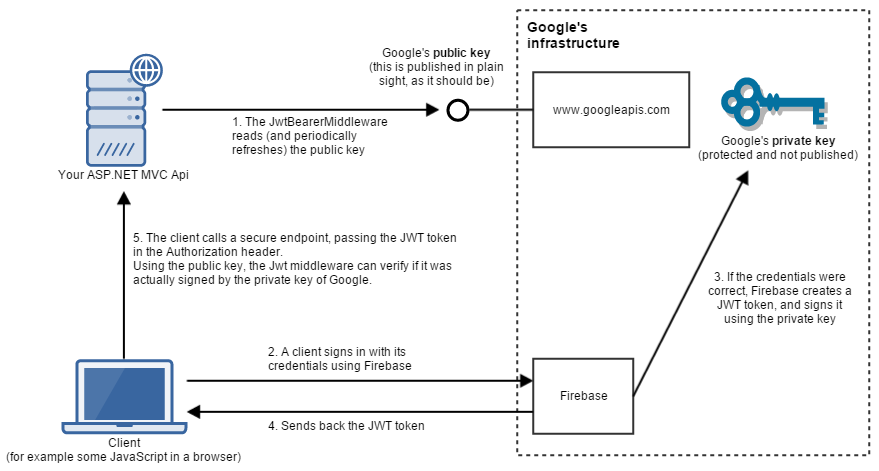
And bellow is the final solution we are using to secure our and third party resources and authenticate a user
Please visit our website and join the mailing list. Our app is coming soon:

http://fitradar.me/

Bringing order in files

One of the main paradigm we followed during Fitradar application development was Object Oriented Programming paradigm. And the main objectives of OOP are:

  • to organize the code in such a way that data and functions using its data stick together in one entity (class),
  • to extract reusable parts in separate entities (classes interfaces).

And as we followed the OOP principles and patterns our big code evolved in to many small files, each representing one or sometimes several entities. Each file contained clean and well organized code that was easy to maintain. From one hand we reduced the size of the files and such improved the navigation within a file but increased the number of files. And the more files we produced the more harder it became to navigate between the files. And very quickly it became clear that we need a new way how to organize our code-base files that anyone could quickly find a needed file. And since there are several ways how to organize the files in packages and the source code packaging really depends on the project, in this article I wanted to share our teams experience on how we found a way that helped us to find file quicker in our code base.

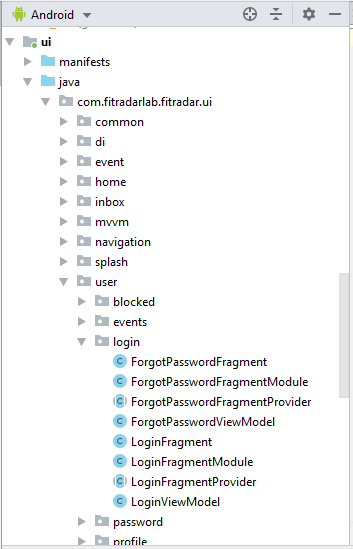
The goal of organizing files in packages is to allow a developer or any other person who is working with a source code easily find a needed data type. In order to achieve this we had to introduce particular principles on how to organize files within a packages. And once a person learns these principles it should be a breeze for him to find a necessary type. When we thought about it, we came to conclusion that these principles should act like search algorithm but for human. The basic partition of our source code in separate projects was predefined by Clean Architecture. It gave us a basic understanding where to put files on the high level. In our first attempt we tried to put the same type data under the same package. For example all the repositories definitions we kept in package com.fitradarlab.fitradar.domain.repository, all the retrofit endpoint definitions we kept in package com.fitradarlab.fitradar.data.net.endpoints and so on. This kind of approach introduced by Clean Architecture worked well in data and domain projects, but when we tied to apply it to the UI project it didn’t really helped us. And the reason was the way how we worked with UI part of the project. Our work was organized around the use cases. And to implement a use case on the UI level we had to work simultaneously on Activity, Fragment, ViewModel, Dagger dependency Module, layout and navigation. All these types were located in different packages and under each package there were already quite a few other files and therefore it was hard to find a needed file fast. First to mitigate the problem we tried to keep all the files of a use case opened, but we realized quickly that the more files we open in Android Studio the less we see of a file name in a tab because it shrinks. So even on our big screens we could have only 5-7 files opened, but in many cases we needed more than that. It was not right away that we noticed that the files we try to keep opened belong to one use case, but once we realized that it became clear that we need to put those files under the same package. Once this discovery was made the new packaging structure for UI project was born. We completely refactored UI project by introducing packages that reassemble the names of our use cases. And thanks to Android Studio refactoring tools it took only a few hours, and after that we really felt comfortable with the new packaging structure. Now we didn’t have to keep the bunch of file opened because all the files we needed to work with were visible under the single package in Project window.

New UI project package structure

But there was still one problem left – the resources files. Contrary to source code where developer can create a hierarchy of packages the resources have only several predefined folders and the most used resource types like layouts and drawables usually have long list of files. And once again we applied the use case approach and came up with following naming convention for our layout files: the layout file starts with the type – fragment, activity, row or view, then we mimic the name of the package and the name ends with unique name of the layout. For example the layout for our timeline page has the name fragment_sport_event_timeline.xml. Unfortunately we still can’t find a good naming strategy for drawables and other shared resources that are not bind to particular use case, but already now with these new naming conventions we see a noticeable improvement in our source code maintenance.

Visit our website and join the mailing list. Our app is coming soon:

http://fitradar.me/

Collaboration between developers and non-developers in FitRadar

Initially when we worked on the idea of Fitradar several people were involved – among them were sports club manager, designer, and developer. Everyone put his ideas on the table and after several brainstorm meetings we came up with initial requirements for our future product. Later all who participated in user requirement creation became in one or another way a tester. The user requirement authors knew the best how the app should work, so they were the ones who could verify the application’s design and the functionality.

Now when we have a tangible product, the people who laid down the requirements want to make sure their ideas are working properly in the application. Some of the features are possible to test via User Interface, like design and navigation. And in this case a screen is serving as a medium of communication between developers and testers. People who are testing the application can take screenshots and explain the problem to developer in a demonstrable way. But how to make sure the business logic implemented in application is behaving according to the requirements. Developers implemented it according to their interpretation of requirements. Although we used UML diagrams tables and pictures, many times the only way to describe the business logic was a human language. And as we know human language is quite ambiguous and fills the gaps with a lot of assumptions and that inevitably leads to misinterpretation. One way for non developer to test the applications business logic is to try to invoke it from a UI and see if it works correctly, but developers and QA know that in such way we are covering just a small portion of test cases. So there must be a better way for user requirement authors, would it be Quality Assure, Business Analysist or any other team member, to make sure the business logic he proposed is functioning as expected.

I already wrote about the test strategy in our team and well known test pyramid. The lower level tests are written by developers and only time when they need an input from other team members is the time when they are interpreting the requirements. Once the requirements are clear they can write the code and accompanying unit tests. Even UI tests can be written with little help from non developers, but the part where user requirement authors start to play important role is functional tests. In case of our app the UI is separated from the rest of application and most of the business logic happens on the back-end. So the functional tests in our team include back-end API tests and mobile application API tests.

The way how we helped the non developers in our team understand the implanted business logic was by using some principles of the Domain Driven Design and Behavior Driven Development. I should say not everything what Eric Evans described in his book “Domain Language Tackling Complexity in the Heart of Software” was applicable to our solution, but some aspects really helped us to establish a good way of collaboration between team members and today I wanted to share those aspect of DDD:

  • Ubiquitous Language, the term introduces by Eric Evans, helped our developers and the rest of the team speak the same language. The main idea of Ubiquitous Language is to create a common vocabulary of a given business domain that both domain experts and developers would speak. It was quite easy to establish since in the process of creation of user requirements both developers and non developers were present and developers knew quite well the business domain. Most of the value of the common language we started to see when developers had to read their implemented logic to non developers
  • The next step when the vocabulary of app was created, was to create the API methods that non developers are able to understand and follow. In order to achieve this API methods were written on such abstraction level that only domain vocabulary was used – all the technical details were hidden in the underlying classes and methods. Even logical operations were converted in to the methods that expressed the domain concept.
  • Once the API methods were in place, the business logic authors could participate in API review. But even then there might be a flaw in the requirements itself. And so we needed to write tests expressed in domain language. For this purpose we use some aspects of Behavior driven development, particularly we used Cucumber language (Gherkin plugin on Android Studio and SpecFlow extension on Visual Studio) for writing functional and UI tests. Since the Cucumber language is intended to be used not only by developers but by regular humans as well then everyone who contributed to our application’s user requirements was able to add tests as well.

Visit our website and join the mailing list. Our app is coming soon: http://fitradar.me/
Logging in our application

Any application to some extent is using the logging system. And we are not an exception. We log a lot of information in our Android and iOS applications as well as in our backend server application. But what logs give us, after all, they are not contributing to the application functionality? They might be a part of user requirements, but why would anyone want to invest money and time for the feature that is not used by a user? Let’s explore the purpose of logs in software development and practices developers are applying.

Here are some of the cases where we are using logging in our applications:

  • during development to make it easier and faster spot a bug along the
    • @NonNull and other annotations and code inspection tool Lint
    • unit and integration tests, where we try to cover most of the code execution paths and integrations points. (And I already wrote how we approached the testing in our project)

    we use logs that show as the trace of actions and values that led to a particular bug. But before we started to use logs we had to answer the following questions:

    • where to put log statements on
    • what information to log

    Since a lot of our code is covered by unit tests then there is little reason to log our own code for debugging and test purposes, but where we don’t have control over the values we are processing is:

    • framework lifecycle methods, like onCreate, on ViewCreate, onResume, onPause in Android application. If our code is using the arguments provided by lifecycle method we log these values and assert the expected value if it is possible
    • to click listeners and other event handlers
    • third party library methods and their returned results. For example, for network calls we are using Retrofit and we always log the network requests and responses in debug build variant. Another example calls to the database. Since we are using Room in Android application, we want to see SQL code sent to the database

    So once we log enough information we can spot the bug just by going through logs and skipping the process of starting the app again with attached debugger and stepping through the code. And we don’t have to worry much about the performance as well since Android logging system is taking care of debug log statements and skip them at runtime.

  • in production:
    • to monitor, on the back end server the logs are used to monitor the normal business logic functionality. We log every request. If the request is successful we log it as info, in case request ends up we log error. When the error is reported on the back end service, the gathered logs are of great value. Very often they allow to spot the problem without further investigation.

    • we log fatal errors, that caused the application stop. On the backend server, we catch the exceptions as early as possible and when the exception is caught it is logged and an email is sent to an administrator. We don’t experience many exceptions outside of our app on the back end part, because the only reason that can lead to such exception is a malformed request and not the back end code itself, and since the request is formed by third party library it is very rear that it is malformed. A different story is with uncaught exceptions on the client – Android or iOS app. It is not possible to catch all the exceptions so they leak and cause the app to crash. To log these kinds of exceptions we use Fabric Crashlytics (Firebase). These logs later help us a lot to find a cause of a crash.

Visit our website and join the mailing list! Our app is coming soon:

http://fitradar.me/

Testing strategy for our application

In this article it’s time to talk about the way how we are testing our application and the strategy for testing we laid down in the application design phase. The experience in the past showed us that one of the good design outcomes is easy testable application. Therefore from the very beginning along with the application architecture we were designing our testing strategy.

The goal of the testing application is to achieve a flawless work of it. The simplest way how to test an application is to do a manual tests, but these tests definitely are not the most effective. Along with the software development evolution test approaches evolved as well. We already new and applied in our other projects such tests as unit tests, integration tests, functional tests and regression tests. But since in our team we don’t have a person who knows about testing techniques, can develop and design an application, we developers decided to explore different testing strategies together with QA who mostly does the tests manually. So we started to investigate other teams experience, information in books and on the web, and started to lay down foundation for our own test strategy that would fit our needs.

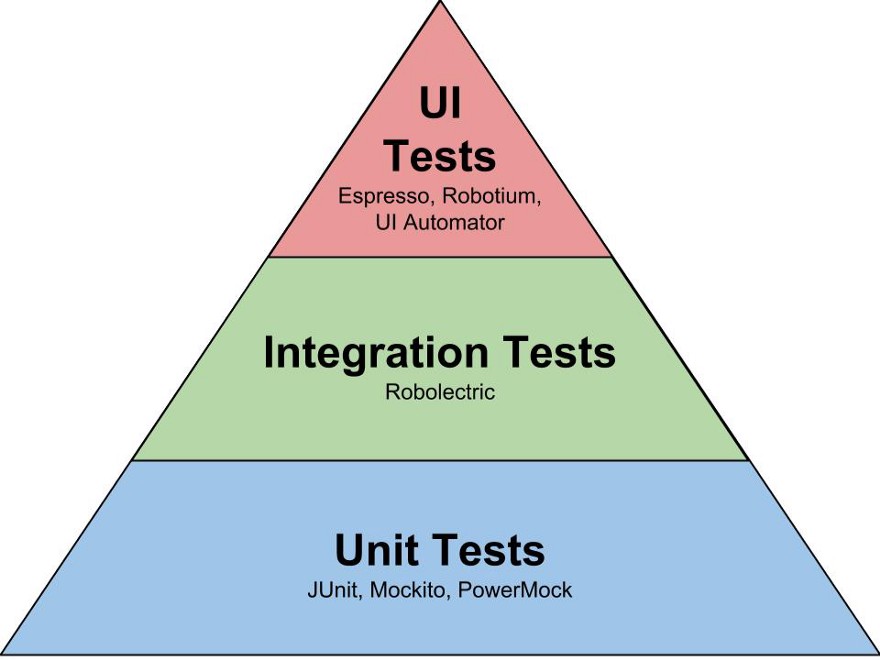
The thing we decided to start with was “Test pyramid” the term Mike Cohn came up with in his book Succeeding with Agile. The pyramid gave us some understanding how to start to organize the tests.

Unit Tests. Taking in to account our own experience, and the information we obtained it was clear that unit tests will be foundation for our test suite. To be able to easy and what is most important quickly write unit tests one should be able to isolate different peaces of software. In case of OOP the paradigm we are following we should be able easy isolate classes. In my opinion this is one of the core principles to successful unit tests. But in order to do that we must have a design that would allow us to isolate the classes. And that is why the dependency injection became very important technique in our software and I even dedicated the whole blog article to it. And to make it easier to implement this principle in our Android application we chose to use Dagger 2 framework. Once we wrote a use case implementation and accompanied unit tests we ask are our QA to test it. Very soon we discovered that despite the fact that we had a quite good coverage of code by unit tests QA still was finding bugs. And as you can guess the errors occurred in the code that interacted with framework, in our case Android framework. So now it became obvious we needed integration tests to make sure that our code callings to third party libraries or framework work flawless.

Integration Tests. According to Test pyramid these tests should be less than unit tests and indeed we already had tests that cover our own code logic, and so in these tests we decided to test only the connection points between our code and the third party libraries. For example in our application we are fetching data from the server and caching the data in database. In our Android application we are using Room persistence library. There is no really way how to test DAO interfaces, without performing the operations on database. And so we had to write tests that involve Room library. Another example is our code that interacts with our back end server via Retrofit library. And again we had to write tests that involve Retrofit library. Although these tests were written in the same manner as unit tests using Junit test framework they covered more than our class or method and were considered as a separate type of tests.

UI tests. The main reason why we decided to write UI tests is because we wanted to fully automate the test process and make it a part of Continues Integration (CI) process. So for Android we chose Espresso framework and as a firsts test we wrote navigation tests, that made sure that we can navigate to every page we have in our application. Then we wrote the tests only for the errors that QA reported and so comparing with the rest of the tests these are making only small portion of all tests.

http://fitradar.me/